
Build a Model
Build a Model
Intent
Prompt the language model to build a prototype of your solution. Explore the prototype, then Start Over and incorporate your findings.
Motivation
No description of a software system—be it a user prompt for a coding assistant to follow, a collection of user stories created in an agile software development methodology, or a detailed functional specification created in a sequential development process—is ever entirely precise, or entirely up to date. Some aren’t even entirely accurate.
Complete fidelity would be undesirable, because it increases the costs of making changes. Any time you need to update the software’s behavior to account for changes in the context, or your customers’ needs, you would need to make the same amount of changes to the description that you make to the software, and do careful verification to ensure that both changes have the same meaning.
Descriptions of software might depend on shared cultural cues, organisation-specific tacit knowledge, or other sources of unspoken information that aren’t explicitly recorded. They might also be ambiguous, as it’s impossible to think of all of the details of a plan upfront. Additionally, there are often situations where you know that multiple implementations—for example, user interface designs—are possible, and don’t know which one you should use until you try it out, or share candidate designs with your customers.
Much of the process in the software development lifecycle handles this ambiguity and encodes it in a feedback loop: proceed based on your current understanding; check whether you’re headed in the correct direction; then, finally, make any corrections, and return to the start of the loop. Rather than building the whole system, build only what you need to answer open questions—for example, when you Disclose Ambiguity—to make the feedback loop faster.
When you build a prototype, remember that it is just a prototype, and that you shouldn’t rely on it in production. It’s very easy to think that because it shows you what you need to know, the prototype is the basis of a working system that you can share with your customers. However, the prototype might be incomplete, or of low quality, and extending it to support your whole solution can be more effort than discarding it and building a new, production-ready implementation. Fred Brooks calls this a Plan to Throw One Away.
Applicability
Use Build a Model when you need to choose between approaches to build your software, or at least determine whether the approach you’ve thought of is acceptable to your customers. For example, if you Ask for Alternatives, Build a Model to understand what each alternative looks like, how you might deploy it, how to work with the code, and whether your coding assistant (or a Bake Off of assistants) work well with the alternative.
Ensure you know the question you need your model to answer before you Build a Model. Be ready to delete your model when you have the answer to your question, and move forward using the answer, not the model. For example, if you use version control, you can Build a Model in a branch that you don’t integrate into the software you release. Write Down TODOs to have your assistant generate software that incorporates your answer, or Stop and Plan to work out how to use the information you learned from your model in your work.
Consequences
Build a Model offers the following benefits:
- Rapidly explore potential solutions, or approaches.
- Learn about your problem without relying on your experimental tests in production.
Example
Stylus Input
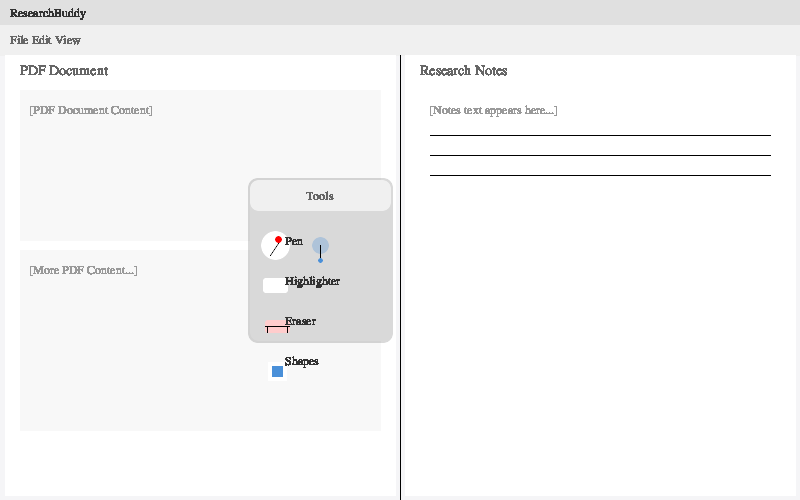
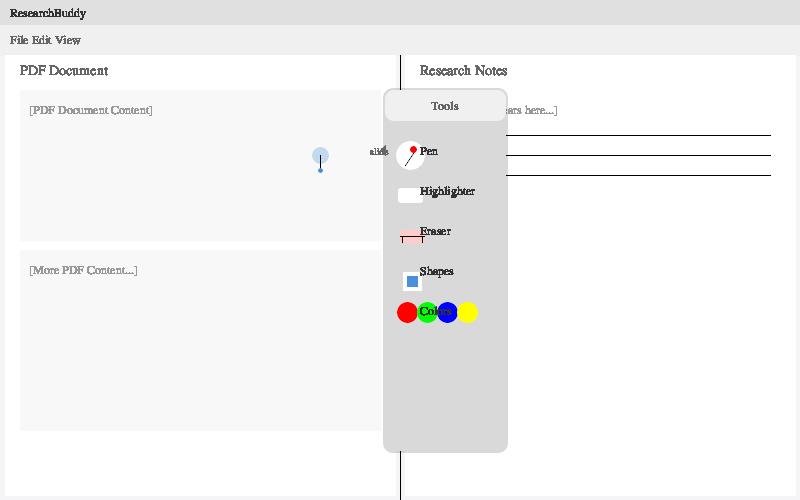
One macOS application I’m working on lets people take notes on research papers by displaying a PDF and a rich text editor in a split view. To explore how I might add support for hand-written or hand-drawn annotations using a stylus, I prompt Qwen3 Coder Next to Ask for Alternatives and then to Build a Model of the two alternatives as images:
This application provides a split view where someone reads a PDF document on the left, and types notes on the right. We want to allow someone to draw annotations or hand-write notes, using a stylus input like Apple Pencil. Suggest two different designs for integrating the stylus input into the user interface, and create SVG images that demonstrate the two designs.
It generates the images shown in figures below which, while not high-fidelity and contain rendering issues, provide enough of a prototype to explore with people who use the app.
Related Patterns
Disclose Ambiguity to understand what's missing from your instructions, that you might need to Build a Model to explore.
Ask for Alternatives to produce suggestions of models to build.
Create a Clean Slate when you move from model to product, so that the assistant doesn’t pay attention to the model’s design.
Remember What We Did to create a decision log that encapsulates what you learn from the models you build.
No comments to display
No comments to display