
Call Out Error
Call Out Error
Intent
Tell the agent when it does something wrong, before you commit to the mistake. You don't need to describe the fix, just the problem.
Motivation
The code (or design, or plan) that a large language model generates can vary from your expectations. There are multiple causes for the variance. One is ambiguity in your prompt, that allows leeway in the generated output that satisfies the stated requirements, but doesn't match your tacit needs.
Others include the language model associating your prompt with concepts that are correlated in the training data, or that appear in the system prompt or the context, but that are indirectly associated with the problem that you state in the prompt. Additionally, the model can hallucinate and generate output that isn't compatible with the material conditions of your problem; for example, producing code that isn't valid in the syntax of the programming language you're using, or using types or functions that don't exist.
When You Review the generated output, you see things that don't align with what you want. In the worst situations, it can feel like the model is cursed, and chooses to maliciously comply with your prompt by generating code that technically matches the brief, but in the worst way possible. The model has no malice, so in these situations You Reflect and identify how to get back on track.
A common problem when you use a coding assistant is that the model generates code with TODO comments and empty implementations for important parts of the generated algorithm. A likely cause for this is that the models are trained on sample code and content from question-and-answer websites, where the authors deliberately leave implementation details unstated so that their samples highlight particular algorithms or APIs.
Whatever the cause of the divergence, describing the difference between expectation and reality is sometimes all it takes to address the issue.
Applicability
Use Call Out Error when You Review the output that a coding assistant generates and find a difference between your expectation of the task and the generated output, that you want the assistant to resolve. There are many sources of such differences, for example:
- Coding issues, for example, a compiler error or a test failure
- Design problems, for example, failing to follow existing modularity constraints
- Functional errors, for example, leaving important behavior unimplemented, or building a UI that's difficult to use.
Call Out Error is easiest to apply when you can readily explain the source of the issue. For example, in the case of a compiler error, “this code doesn't even build” can be enough of a prompt to cause the model to generated correct output. In more complex situations, you might need to iteratively take Baby Steps towards resolution, or even Start Over, using a different approach.
If you find yourself using Call Out Error repeatedly, You Reflect to consider whether a different approach would yield better results. You might need to Stop and Plan to think through the details of the problem you're prompting the agent to work on.
Alternatively, Record Prompt to capture details of an error that the agent often makes, along with instructions on resolving it.
Consequences
Call Out Error offers the following benefits:
- Resolve discrepancies between code the model generates, and your requirements of that code.
- Iteratively approach a satisfactory solution.
- Use generative tools to solve problems that generative tools caused; defer manual review for later.
Implementation
Apply Call Out Error by creating a prompt that describes the error you want the agent to address. For example, in the case of a test failure, your prompt could be:
Fix the code in @src/com/example/.../reticulation.java so that TestSplineReticulationWithEmptyNodeList in @test/com/example/.../reticulation\_tests.java passes
Or even, just this:
Ensure the tests pass.
Call Out Error is useful when the information about the (erroneous) generated output is still in the model's context, so you typically don't need to provide a Clean Slate before you work on fixing the error. In situations where the model frequently generates output that contains the same error or similar errors, apply Extract Prompt to describe avoiding the error upfront.
When it takes multiple iterations to address the error, Record Prompt to create a prompt that accounts for the fixes in all of the iterations.
Example
Nested Menus
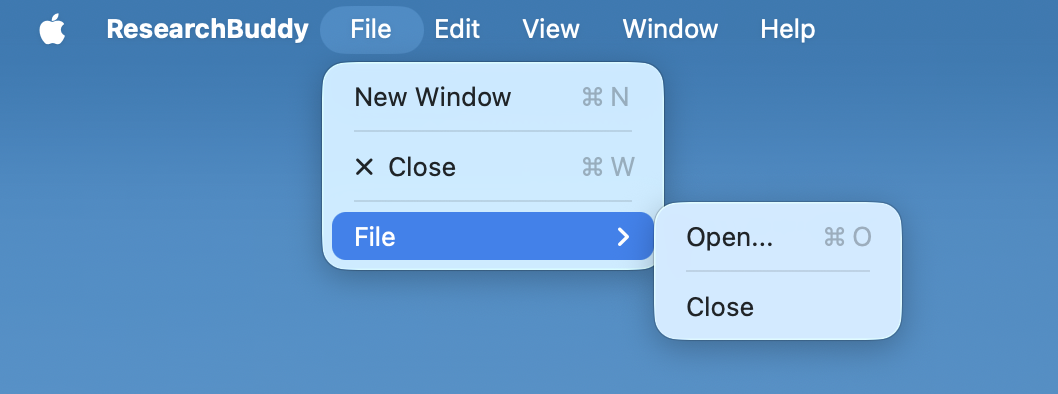
In creating a Mac application that works with multiple files, Devstral Small 2 in Xcode created a menu structure that nested a File menu inside the app's File menu, with the Open item inside the second-level menu alongside a redundant Close item. For consistency with other Mac applications, both items need to be in the main File menu, and the main File menu shouldn't contain another File menu. I initially attempted to fix this by describing both the problem, and the desired result:
Now there are two nested File menus. The Open and Close items should both be in the top-level File menu, and there shouldn't be a Quit item in the File menu.
Image:
The generated code contained a compiler error. I used Call Out Error to indicate this error, without describing the error or how I would manually fix it:
Fix error in ResearchBuddyApp.swift on line 17
While this fixed the compiler error, the menu layout issue persisted. I re-applied Call Out Error, again without giving any details of the error or a way to address the problem:
This hasn't fixed the menu item placement.
Image:
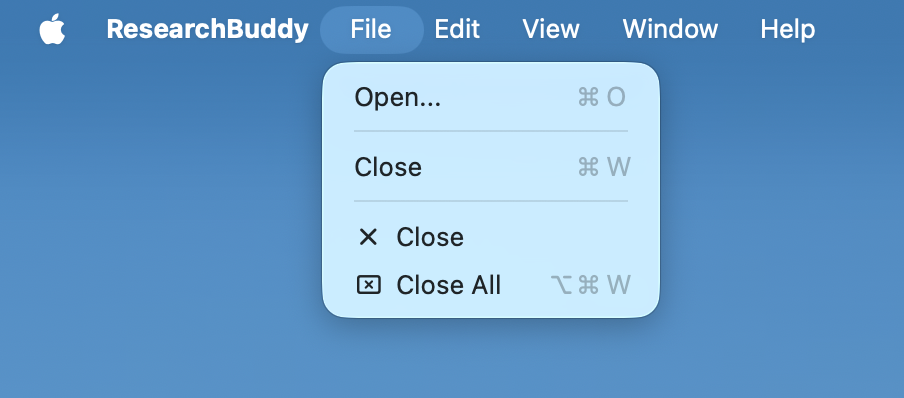
The agent correctly resolved the menu hierarchy:
Related Patterns
Disclose Ambiguity to uncover ways in which the model's generated output could diverge from your expectations, and choose resolutions.
Stop and Plan to ensure your requirements are clear in your mind before you generate the wrong code.
You Review to ensure that the model generated the right thing.
Trust the Tests to tell you when you're done, not the agent's completion report.
No comments to display
No comments to display